> ## Documentation Index
> Fetch the complete documentation index at: https://celoref.mintlify.site/llms.txt
> Use this file to discover all available pages before exploring further.
# Architecture
> System, payment, multichain, facilitator, and AC2 architectures for PIXA.
# Architecture
PIXA is easiest to understand as a layered system:
* the MCP package that Claude Desktop or another agent runtime loads
* the browser-based approval flows for on-ramp, rekey, and other user actions
* the PIXA Hub payment router for non-Algorand settlement paths
* the service discovery and x402 payment layer
* the future AC2 session layer for bounded delegation
## 1. Core Architecture
This is the main architecture image for PIXA.
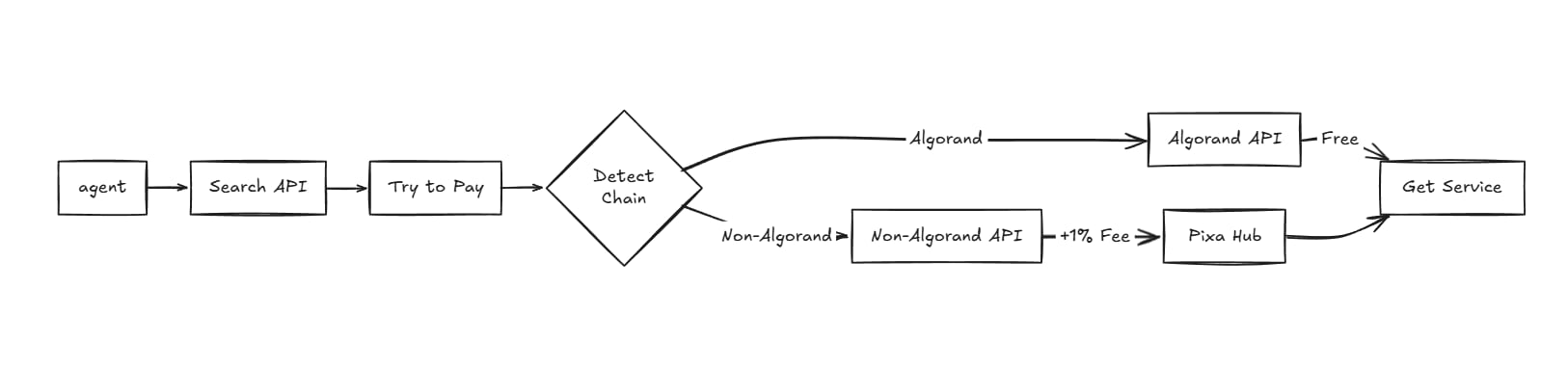 This diagram shows the primary product split:
* agent flow starts with search and payment intent
* the chain is detected after the payment attempt
* Algorand routes stay free and direct
* non-Algorand routes add the PIXA Hub fee and settle through a facilitator
* the service is released after settlement
```mermaid theme={null}
%%{init: {
"theme": "base",
"themeVariables": {
"background": "#ffffff",
"primaryColor": "#ffffff",
"primaryTextColor": "#000000",
"primaryBorderColor": "#000000",
"secondaryColor": "#ffffff",
"secondaryTextColor": "#000000",
"secondaryBorderColor": "#000000",
"tertiaryColor": "#ffffff",
"tertiaryTextColor": "#000000",
"tertiaryBorderColor": "#000000",
"lineColor": "#000000",
"textColor": "#000000",
"fontFamily": "ui-sans-serif, system-ui, sans-serif"
}
}%%
flowchart LR
U[User] -->|funds wallet| A[Algorand wallet]
U -->|uses| M[PIXA MCP package]
M -->|search / pay / fetch| S[Service discovery and x402 layer]
M -->|approval flows| B[Browser / hosted pages]
M -->|non-Algorand route| H[PIXA Hub]
H -->|settles| F[Specific facilitator or partner rail]
S -->|resource access| X[API or service]
B -->|on-ramp / rekey / approvals| U
```
PIXA keeps one user-visible wallet, then routes the rest of the complexity behind the scenes.
## 2. Normal Algorand Payment Flow
This is the fast path when the service can be paid directly from the Algorand side.
```mermaid theme={null}
%%{init: {
"theme": "base",
"themeVariables": {
"background": "#ffffff",
"primaryColor": "#ffffff",
"primaryTextColor": "#000000",
"primaryBorderColor": "#000000",
"secondaryColor": "#ffffff",
"secondaryTextColor": "#000000",
"secondaryBorderColor": "#000000",
"lineColor": "#000000",
"textColor": "#000000"
}
}%%
flowchart TD
U[User] --> A[Algorand wallet]
A --> P[PIXA MCP pay tool]
P --> D[Detect payment chain]
D -->|Algorand route| L[Algorand API / direct payment]
L --> S[Service returns resource]
S --> O[Done]
```
This is the cleanest path for direct wallet-backed API access.
## 3. Non-Algorand Payment Flow
When the target service is on another chain, PIXA adds a hub step and a small routing fee.
```mermaid theme={null}
%%{init: {
"theme": "base",
"themeVariables": {
"background": "#ffffff",
"primaryColor": "#ffffff",
"primaryTextColor": "#000000",
"primaryBorderColor": "#000000",
"secondaryColor": "#ffffff",
"secondaryTextColor": "#000000",
"secondaryBorderColor": "#000000",
"lineColor": "#000000",
"textColor": "#000000"
}
}%%
flowchart TD
U[User] --> A[Algorand wallet]
A --> P[PIXA MCP pay tool]
P --> D[Detect payment chain]
D -->|Non-Algorand route| H[PIXA Hub]
H --> C[Add routing fee: amount + 1%]
C --> F[Specific facilitator / settlement path]
F --> S[Service returns resource]
S --> O[Done]
```
This is the operator-backed path that lets PIXA support other chains without giving the user multiple wallets.
## 4. Multi-Facilitator Settlement View
PIXA does not need to rely on only one execution path forever. Different services can be settled by different facilitators.
```mermaid theme={null}
%%{init: {
"theme": "base",
"themeVariables": {
"background": "#ffffff",
"primaryColor": "#ffffff",
"primaryTextColor": "#000000",
"primaryBorderColor": "#000000",
"secondaryColor": "#ffffff",
"secondaryTextColor": "#000000",
"secondaryBorderColor": "#000000",
"lineColor": "#000000",
"textColor": "#000000"
}
}%%
flowchart LR
U[User] --> M[PIXA MCP]
M --> H[PIXA Hub]
H --> F1[Facilitator A]
H --> F2[Facilitator B]
H --> F3[Direct chain settlement]
F1 --> S1[Service class 1]
F2 --> S2[Service class 2]
F3 --> S3[Service class 3]
```
The point is not that one backend must handle everything. The point is that the user should only see one control surface.
## 5. AC2 Session Model
This is the future bounded-authority layer for higher-risk actions.
```mermaid theme={null}
%%{init: {
"theme": "base",
"themeVariables": {
"background": "#ffffff",
"primaryColor": "#ffffff",
"primaryTextColor": "#000000",
"primaryBorderColor": "#000000",
"secondaryColor": "#ffffff",
"secondaryTextColor": "#000000",
"secondaryBorderColor": "#000000",
"lineColor": "#000000",
"textColor": "#000000"
}
}%%
flowchart TD
U[User] --> A[AC2 approval request]
A --> W[Wallet or hosted approval page]
W --> S[Session created]
S --> E[Expiry or spend cap]
S --> R[Agent operates inside session]
U --> V[Revoke session]
V --> X[Authority removed]
```
AC2 is how PIXA can move from simple payment routing to explicit delegated authority.
## 6. What Each Block Does
* MCP package: exposes the tools the agent calls
* Browser page: handles approval-heavy actions that should not stay inside the Claude iframe
* PIXA Hub: handles treasury-backed routing and non-Algorand settlement
* Facilitator: executes the actual settlement or relay step for a specific network
* AC2: turns approval into a temporary, revocable session instead of a one-time yes/no click
## 7. Reading Order
If you are explaining PIXA to a judge or developer, read it in this order:
1. one Algorand-funded wallet
2. direct Algorand payment path
3. non-Algorand hub path with the routing fee
4. multi-facilitator settlement behind the hub
5. AC2 session control for stricter authority
That order matches the product from simplest to most advanced.
This diagram shows the primary product split:
* agent flow starts with search and payment intent
* the chain is detected after the payment attempt
* Algorand routes stay free and direct
* non-Algorand routes add the PIXA Hub fee and settle through a facilitator
* the service is released after settlement
```mermaid theme={null}
%%{init: {
"theme": "base",
"themeVariables": {
"background": "#ffffff",
"primaryColor": "#ffffff",
"primaryTextColor": "#000000",
"primaryBorderColor": "#000000",
"secondaryColor": "#ffffff",
"secondaryTextColor": "#000000",
"secondaryBorderColor": "#000000",
"tertiaryColor": "#ffffff",
"tertiaryTextColor": "#000000",
"tertiaryBorderColor": "#000000",
"lineColor": "#000000",
"textColor": "#000000",
"fontFamily": "ui-sans-serif, system-ui, sans-serif"
}
}%%
flowchart LR
U[User] -->|funds wallet| A[Algorand wallet]
U -->|uses| M[PIXA MCP package]
M -->|search / pay / fetch| S[Service discovery and x402 layer]
M -->|approval flows| B[Browser / hosted pages]
M -->|non-Algorand route| H[PIXA Hub]
H -->|settles| F[Specific facilitator or partner rail]
S -->|resource access| X[API or service]
B -->|on-ramp / rekey / approvals| U
```
PIXA keeps one user-visible wallet, then routes the rest of the complexity behind the scenes.
## 2. Normal Algorand Payment Flow
This is the fast path when the service can be paid directly from the Algorand side.
```mermaid theme={null}
%%{init: {
"theme": "base",
"themeVariables": {
"background": "#ffffff",
"primaryColor": "#ffffff",
"primaryTextColor": "#000000",
"primaryBorderColor": "#000000",
"secondaryColor": "#ffffff",
"secondaryTextColor": "#000000",
"secondaryBorderColor": "#000000",
"lineColor": "#000000",
"textColor": "#000000"
}
}%%
flowchart TD
U[User] --> A[Algorand wallet]
A --> P[PIXA MCP pay tool]
P --> D[Detect payment chain]
D -->|Algorand route| L[Algorand API / direct payment]
L --> S[Service returns resource]
S --> O[Done]
```
This is the cleanest path for direct wallet-backed API access.
## 3. Non-Algorand Payment Flow
When the target service is on another chain, PIXA adds a hub step and a small routing fee.
```mermaid theme={null}
%%{init: {
"theme": "base",
"themeVariables": {
"background": "#ffffff",
"primaryColor": "#ffffff",
"primaryTextColor": "#000000",
"primaryBorderColor": "#000000",
"secondaryColor": "#ffffff",
"secondaryTextColor": "#000000",
"secondaryBorderColor": "#000000",
"lineColor": "#000000",
"textColor": "#000000"
}
}%%
flowchart TD
U[User] --> A[Algorand wallet]
A --> P[PIXA MCP pay tool]
P --> D[Detect payment chain]
D -->|Non-Algorand route| H[PIXA Hub]
H --> C[Add routing fee: amount + 1%]
C --> F[Specific facilitator / settlement path]
F --> S[Service returns resource]
S --> O[Done]
```
This is the operator-backed path that lets PIXA support other chains without giving the user multiple wallets.
## 4. Multi-Facilitator Settlement View
PIXA does not need to rely on only one execution path forever. Different services can be settled by different facilitators.
```mermaid theme={null}
%%{init: {
"theme": "base",
"themeVariables": {
"background": "#ffffff",
"primaryColor": "#ffffff",
"primaryTextColor": "#000000",
"primaryBorderColor": "#000000",
"secondaryColor": "#ffffff",
"secondaryTextColor": "#000000",
"secondaryBorderColor": "#000000",
"lineColor": "#000000",
"textColor": "#000000"
}
}%%
flowchart LR
U[User] --> M[PIXA MCP]
M --> H[PIXA Hub]
H --> F1[Facilitator A]
H --> F2[Facilitator B]
H --> F3[Direct chain settlement]
F1 --> S1[Service class 1]
F2 --> S2[Service class 2]
F3 --> S3[Service class 3]
```
The point is not that one backend must handle everything. The point is that the user should only see one control surface.
## 5. AC2 Session Model
This is the future bounded-authority layer for higher-risk actions.
```mermaid theme={null}
%%{init: {
"theme": "base",
"themeVariables": {
"background": "#ffffff",
"primaryColor": "#ffffff",
"primaryTextColor": "#000000",
"primaryBorderColor": "#000000",
"secondaryColor": "#ffffff",
"secondaryTextColor": "#000000",
"secondaryBorderColor": "#000000",
"lineColor": "#000000",
"textColor": "#000000"
}
}%%
flowchart TD
U[User] --> A[AC2 approval request]
A --> W[Wallet or hosted approval page]
W --> S[Session created]
S --> E[Expiry or spend cap]
S --> R[Agent operates inside session]
U --> V[Revoke session]
V --> X[Authority removed]
```
AC2 is how PIXA can move from simple payment routing to explicit delegated authority.
## 6. What Each Block Does
* MCP package: exposes the tools the agent calls
* Browser page: handles approval-heavy actions that should not stay inside the Claude iframe
* PIXA Hub: handles treasury-backed routing and non-Algorand settlement
* Facilitator: executes the actual settlement or relay step for a specific network
* AC2: turns approval into a temporary, revocable session instead of a one-time yes/no click
## 7. Reading Order
If you are explaining PIXA to a judge or developer, read it in this order:
1. one Algorand-funded wallet
2. direct Algorand payment path
3. non-Algorand hub path with the routing fee
4. multi-facilitator settlement behind the hub
5. AC2 session control for stricter authority
That order matches the product from simplest to most advanced.